CloudShell - Install the latest AWS.Tools for PowerShell
by Craig Cooley
Since the CloudShell environment is prebuilt, you can't update the pre-installed modules, but you can download the latest AWS.Tools modules into the CloudShell User directory:
- Home / User Directory:
/home/cloudshell-user/.local/share/powershell/Modules - Read-Only system Directory:
/opt/microsoft/powershell/7/Modules/
When the same PowerShell Module (eg AWS.Tools.EC2) is found in both locations, PowerShell defaults to modules in the user directory before the modules included with CloudShell system directory.
To install the latest AWS.Tools modules, you can upload the tools.sh script to CloudShell (see below)
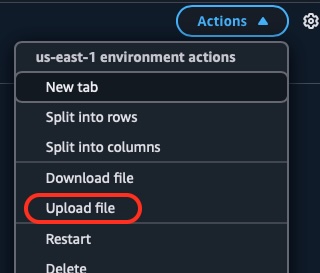
Mark the script as executable and run tools.sh
chmod +x tools.sh
./tools.sh
Alternatively, you can simply paste the script into the CloudShell console.
Either method will install the latest version of all AWS.Tools modules and launch pwsh in less than 5 seconds.
You can check the module version by running Get-AWSPowerShellVersion
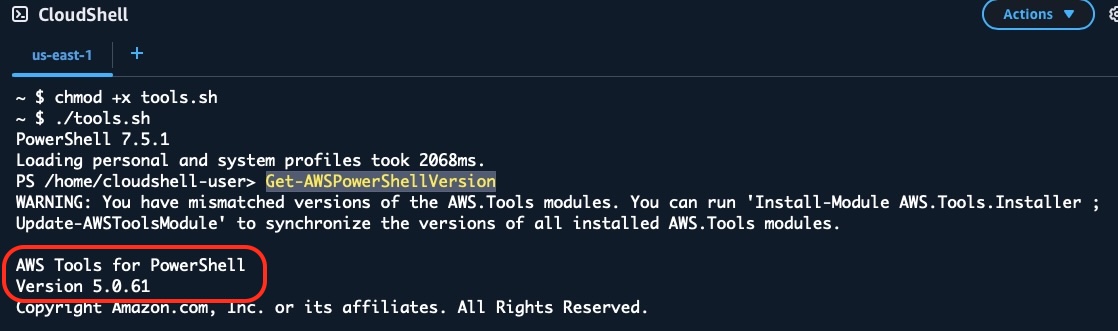
- You can ignore the warning message.
Update-AWSToolsModulewill also install moduels to the user folder, however it takes significantly longer to run.
WARNING: You have mismatched versions of the AWS.Tools modules. You can run 'Install-Module AWS.Tools.Installer ; Update-AWSToolsModule' to synchronize the versions of all installed AWS.Tools modules.
Note: CloudShell is limited to 1GB local storage and the latest AWS.Tools consumes about .750 GB.
To remove all AWS.Tools modules from the user directory, run this command from a bash prompt (not PowerShell)
find "/home/cloudshell-user/.local/share/powershell/Modules" -type d -name "AWS.Tools.*" -exec rm -rf {} \; 2>/dev/null || true
tools.sh
# Upload this file to CloudShell, run 'chmod +x tools.sh' and execute from a bash prompt
# Alternate - copy and paste into a CloudShell session
find "/home/cloudshell-user/.local/share/powershell/Modules" -type d -name "AWS.Tools.*" -exec rm -rf {} \; 2>/dev/null || true
curl -s -o AWS.Tools.zip "https://sdk-for-net.amazonwebservices.com/ps/v5/latest/AWS.Tools.zip"
unzip -q -o AWS.Tools.zip -d "/home/cloudshell-user/.local/share/powershell/Modules"
rm -f AWS.Tools.zip
pwsh